> For the complete documentation index, see [llms.txt](https://docs.rh-webdesign.com/cms-bundle/llms.txt). Markdown versions of documentation pages are available by appending `.md` to page URLs; this page is available as [Markdown](https://docs.rh-webdesign.com/cms-bundle/en/blog/verwaltung/blogs.md).

# Blogs

Create one or more blogs, define their comment rules and assign layouts.

A **blog** is the top-level container for your content – comparable to a magazine. You can run several blogs in parallel (e.g. a guide and a travel magazine); each blog has its own categories, its own comment rules and its own entry point in the navigation.

<figure><img src="https://118894700-files.gitbook.io/~/files/v0/b/gitbook-x-prod.appspot.com/o/spaces%2Fhdsmo3ttoHQpDlitXnzA%2Fuploads%2Fgit-blob-91a45f830af1750b337b4724896eebc8ce225868%2Fblog-blogs-liste.webp?alt=media" alt=""><figcaption><p>The blog overview under Catalogues → Blog → Blogs</p></figcaption></figure>

<table><thead><tr><th width="220">Column</th><th>Description</th></tr></thead><tbody><tr><td>Name</td><td>Name of the blog. A click on it opens the blog for editing.</td></tr><tr><td>Active</td><td>Only active blogs are shown in the storefront.</td></tr><tr><td>Posts</td><td>Number of posts in this blog (via the assigned categories).</td></tr><tr><td>Categories</td><td>Number of assigned categories.</td></tr><tr><td>SEO</td><td>Indicator of whether the SEO fields (meta title/description) are maintained.</td></tr><tr><td>Created at</td><td>Creation date of the blog.</td></tr></tbody></table>

Use **Create blog** at the top right to add a new blog. Editing is split into several tabs.

## General

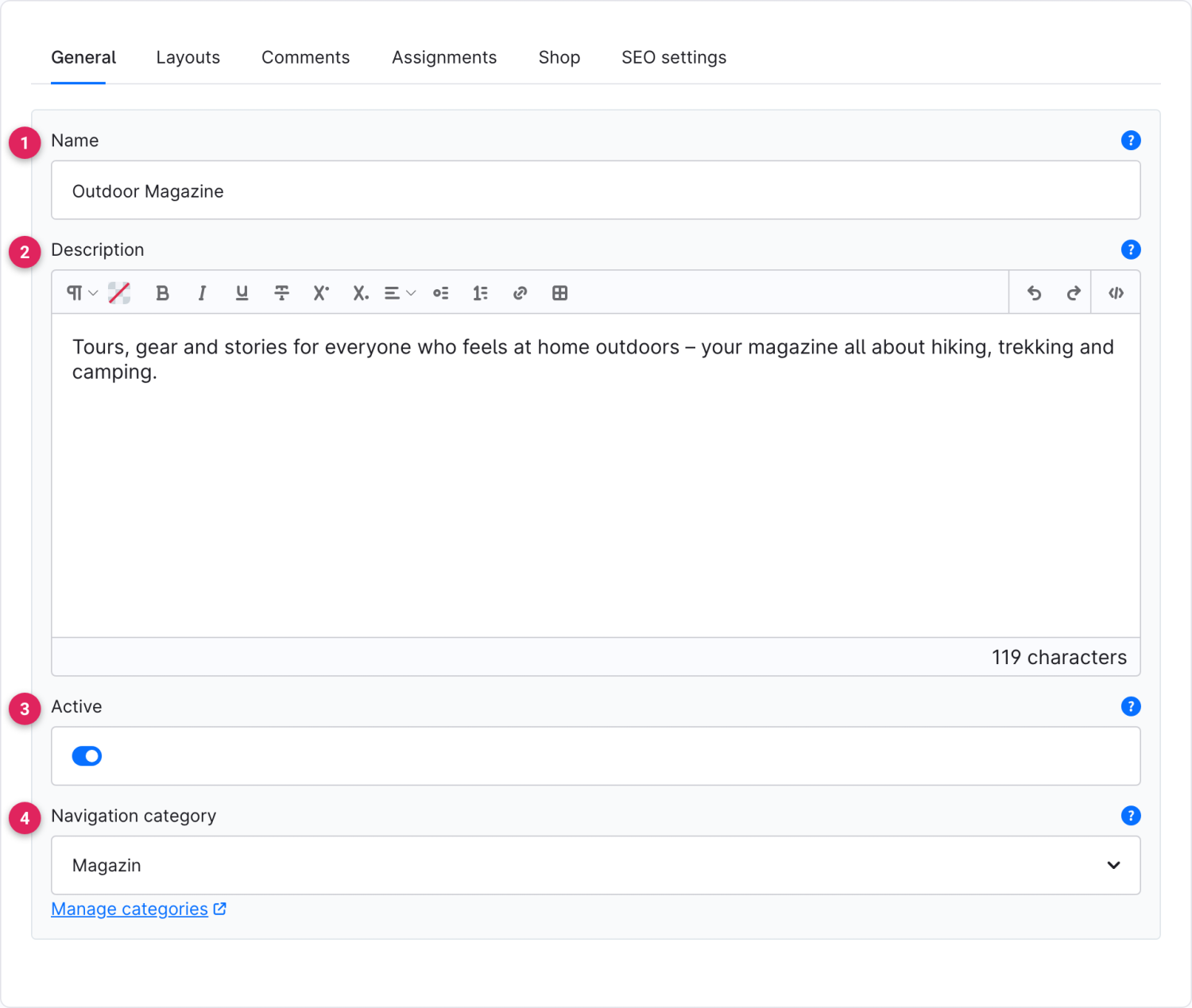
<figure><img src="https://118894700-files.gitbook.io/~/files/v0/b/gitbook-x-prod.appspot.com/o/spaces%2Fhdsmo3ttoHQpDlitXnzA%2Fuploads%2Fgit-blob-852ba1a1118121766af2ce58e6760a2183281e22%2Fblog-blog-allgemein.webp?alt=media" alt=""><figcaption></figcaption></figure>

<table><thead><tr><th width="287">Function</th><th>Description</th></tr></thead><tbody><tr><td>Name (1)</td><td>Name of the blog as it appears in the storefront.</td></tr><tr><td>Description (2)</td><td>Optional introductory text that can be shown e.g. on the overview page.</td></tr><tr><td>Active (3)</td><td>Toggles the blog visible or hidden in the storefront.</td></tr><tr><td>Navigation category (4)</td><td>Links a shop category as an entry point so the blog appears in the navigation. Details under <a href="/cms-bundle/en/blog/storefront/navigation.md">Navigation</a>.</td></tr></tbody></table>

## Comments

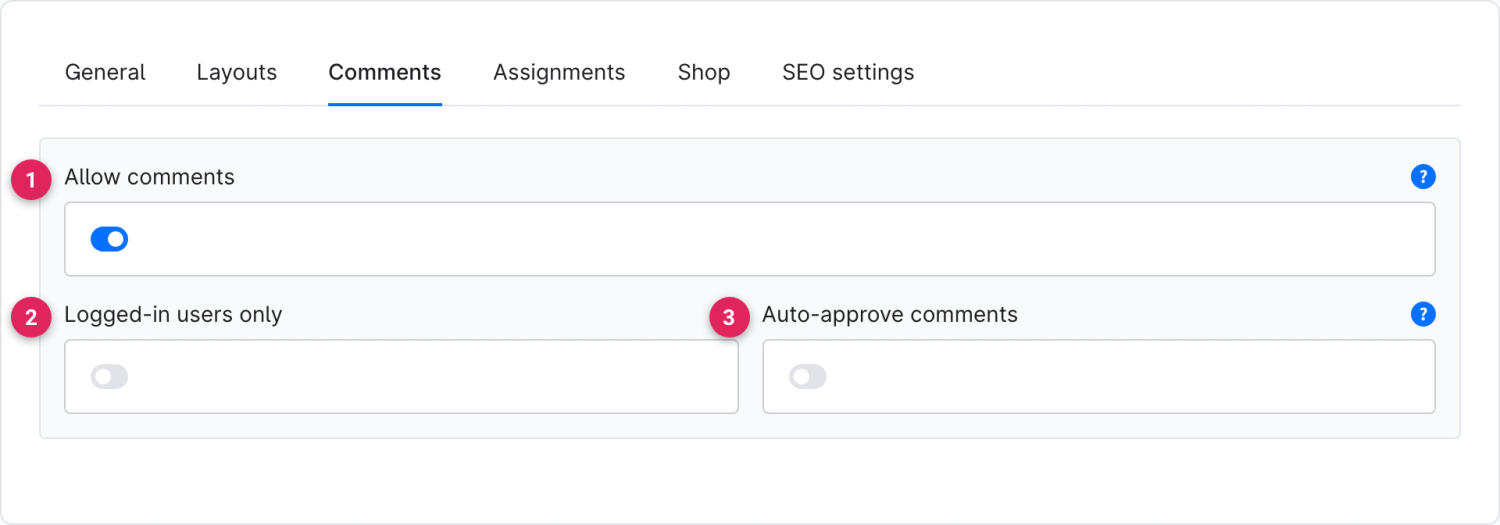
Here you define the comment rules for **all** posts of this blog. Individual posts can override this default later (see [Posts](/cms-bundle/en/blog/verwaltung/beitraege.md)).

<figure><img src="https://118894700-files.gitbook.io/~/files/v0/b/gitbook-x-prod.appspot.com/o/spaces%2Fhdsmo3ttoHQpDlitXnzA%2Fuploads%2Fgit-blob-8f52de59bb87379c4f070613be7c4cf8bbc66680%2Fblog-blog-kommentare.webp?alt=media" alt=""><figcaption></figcaption></figure>

<table><thead><tr><th width="287">Function</th><th>Description</th></tr></thead><tbody><tr><td>Allow comments (1)</td><td>Turns the comment feature for this blog on or off in general.</td></tr><tr><td>Logged-in users only (2)</td><td>When active, only logged-in customers may comment. Otherwise guests can comment too, using their name and email.</td></tr><tr><td>Auto-approve comments (3)</td><td>When active, new comments appear immediately. Otherwise they first have to be checked under <a href="/cms-bundle/en/blog/verwaltung/kommentare.md">Comments</a>.</td></tr></tbody></table>

## Layouts

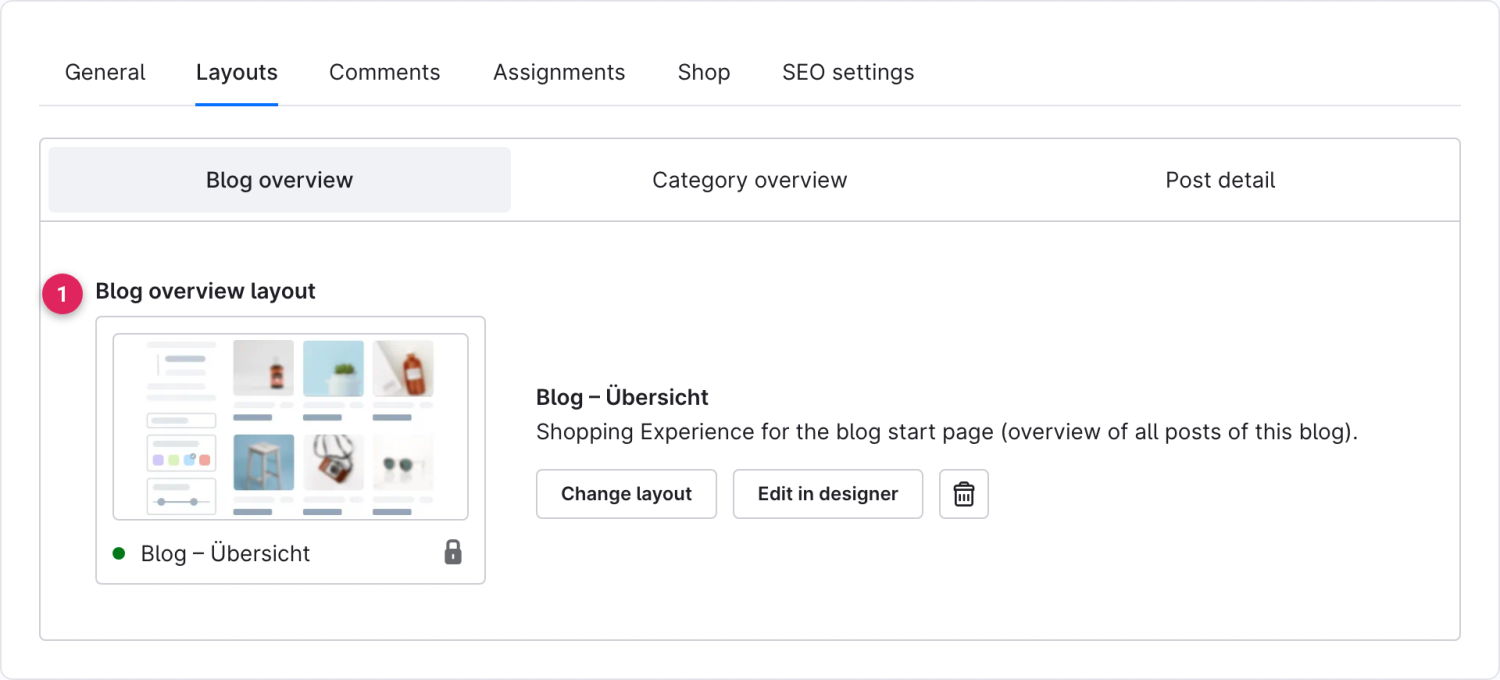
Every blog ships with three default layouts (shopping experiences) that you can assign freely. Categories and posts inherit these layouts as long as they don't define their own.

<figure><img src="https://118894700-files.gitbook.io/~/files/v0/b/gitbook-x-prod.appspot.com/o/spaces%2Fhdsmo3ttoHQpDlitXnzA%2Fuploads%2Fgit-blob-260b286416f36e5048e9ae7ab1d1b1feacaaf558%2Fblog-blog-layouts.webp?alt=media" alt=""><figcaption></figcaption></figure>

<table><thead><tr><th width="287">Function</th><th>Description</th></tr></thead><tbody><tr><td>Blog overview layout (1)</td><td>Shopping experience for the blog's start page. Via the <strong>Category overview</strong> and <strong>Post detail</strong> tabs you additionally set the default layouts for category pages and post pages.</td></tr></tbody></table>

{% hint style="info" %}
Via the remaining tabs you assign **categories** to the blog (tab *Assignments*), store shop products for the shopping-experience elements (tab *Shop*) and maintain the **SEO** details (meta title, meta description, slug).
{% endhint %}