> For the complete documentation index, see [llms.txt](https://docs.rh-webdesign.com/cms-bundle/llms.txt). Markdown versions of documentation pages are available by appending `.md` to page URLs; this page is available as [Markdown](https://docs.rh-webdesign.com/cms-bundle/en/blog/verwaltung/kommentare.md).

# Comments

Moderate reader comments centrally – approve, decline and filter by status or blog.

Under **Comments** you moderate all reader comments of your blogs in one central place. Whether a comment needs to be checked at all depends on the blog setting **Auto-approve comments** (see [Blogs](/cms-bundle/en/blog/verwaltung/blogs.md)).

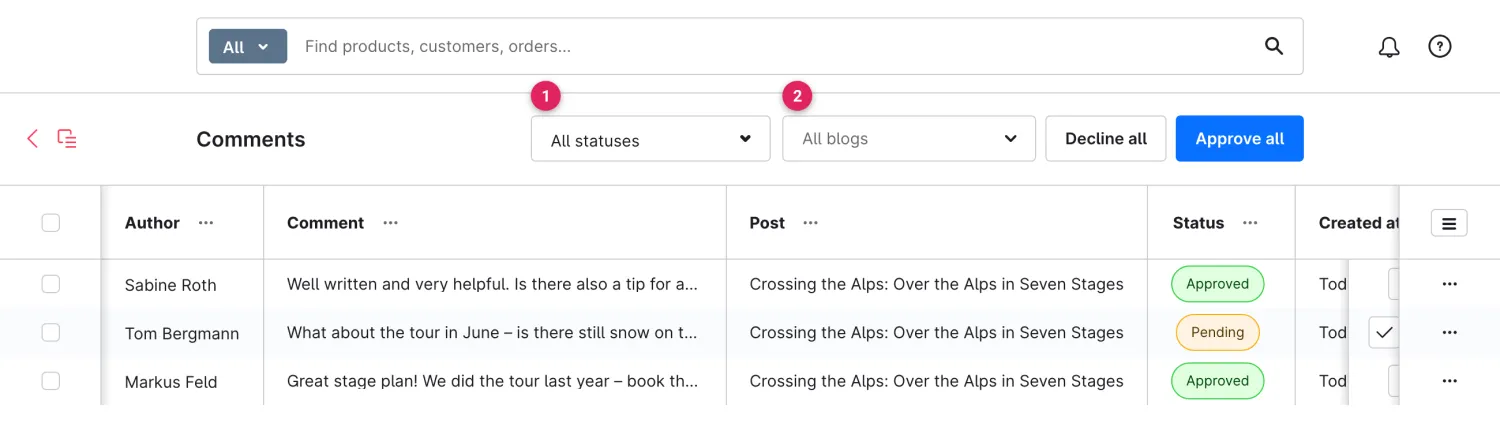
<figure><img src="https://118894700-files.gitbook.io/~/files/v0/b/gitbook-x-prod.appspot.com/o/spaces%2Fhdsmo3ttoHQpDlitXnzA%2Fuploads%2Fgit-blob-9514cde69ee271e1322e77e961c1e351d9449b3e%2Fblog-kommentare-liste.webp?alt=media" alt=""><figcaption><p>Comment moderation under Catalogues → Blog → Comments</p></figcaption></figure>

<table><thead><tr><th width="287">Function</th><th>Description</th></tr></thead><tbody><tr><td>Status filter (1)</td><td>Shows only comments of a certain status: <strong>All statuses</strong>, Pending, Approved or Declined.</td></tr><tr><td>Blog filter (2)</td><td>Narrows the list down to the comments of a single blog.</td></tr><tr><td>Approve all / Decline all</td><td>Bulk actions at the top right: set all currently filtered comments to approved or declined at once.</td></tr><tr><td>Columns</td><td><strong>Author</strong>, <strong>Comment</strong> (excerpt), <strong>Post</strong> (linked), <strong>Status</strong> (colour-coded) and <strong>Created at</strong>.</td></tr><tr><td>Actions</td><td>Per row: <strong>Approve</strong> (check), <strong>Decline</strong> (cross) and <strong>Delete</strong> (trash). Via the context menu “To the post” takes you straight to the article.</td></tr></tbody></table>

{% hint style="info" %}
You can also select several comments via the checkboxes and **Approve** or **Decline** them together using the bulk action that appears.
{% endhint %}

## The statuses at a glance

<table><thead><tr><th width="220">Status</th><th>Meaning</th></tr></thead><tbody><tr><td><strong>Pending</strong></td><td>A new comment waiting for approval. Not yet visible in the storefront.</td></tr><tr><td><strong>Approved</strong></td><td>Checked and publicly visible in the storefront.</td></tr><tr><td><strong>Declined</strong></td><td>Declined and therefore hidden – kept for traceability until it is deleted.</td></tr></tbody></table>

## Moderation directly on the post

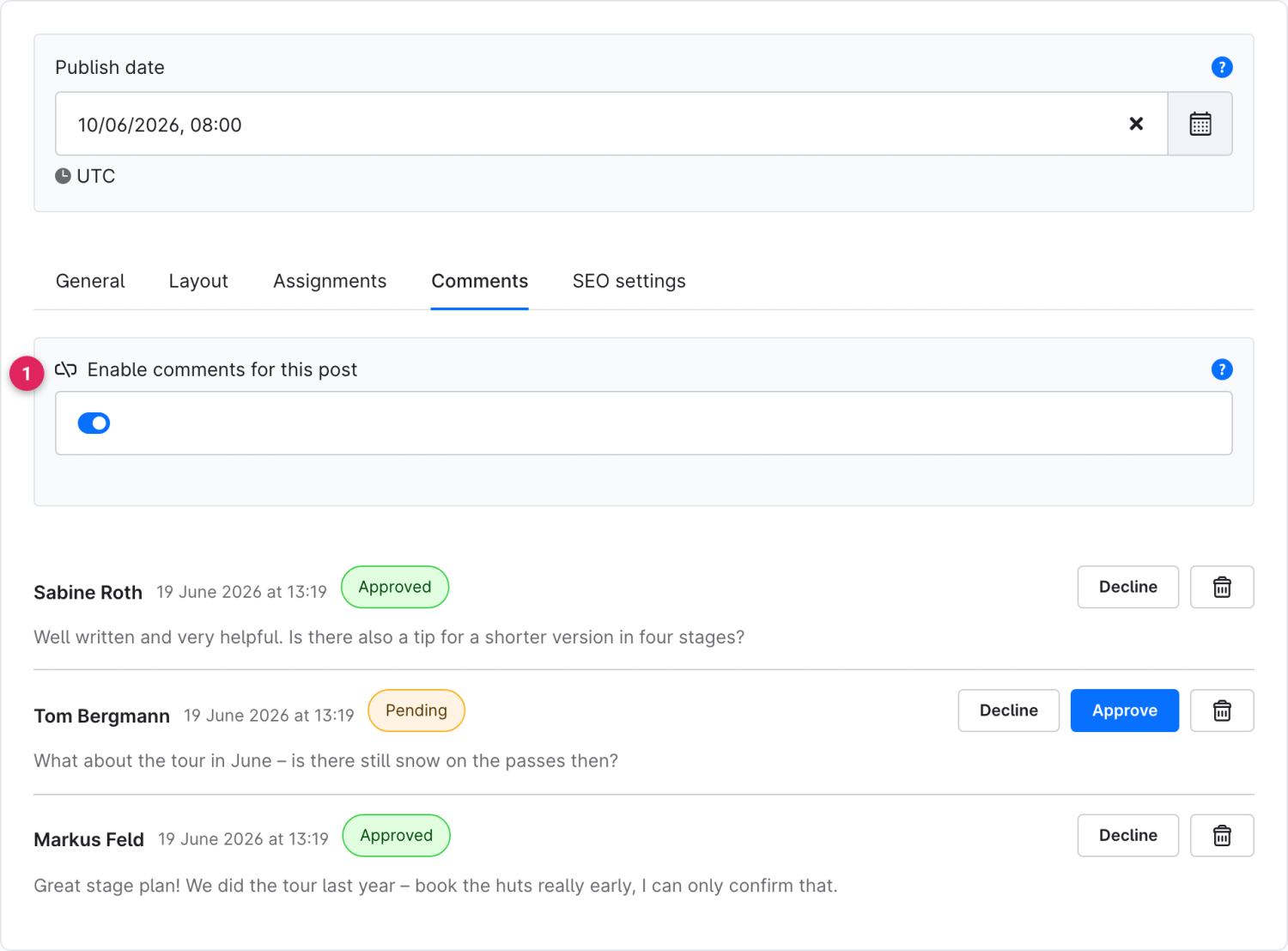
Alternatively you moderate comments right in the [post editor](/cms-bundle/en/blog/verwaltung/beitraege.md) in the **Comments** tab – handy when you are editing a post anyway.

<figure><img src="https://118894700-files.gitbook.io/~/files/v0/b/gitbook-x-prod.appspot.com/o/spaces%2Fhdsmo3ttoHQpDlitXnzA%2Fuploads%2Fgit-blob-d36a821da18ce61aba22652290c19c8d7093d541%2Fblog-beitrag-kommentare.webp?alt=media" alt=""><figcaption><p>Comment moderation in the post editor</p></figcaption></figure>