> For the complete documentation index, see [llms.txt](https://docs.rh-webdesign.com/cms-bundle/llms.txt). Markdown versions of documentation pages are available by appending `.md` to page URLs; this page is available as [Markdown](https://docs.rh-webdesign.com/cms-bundle/en/blog/verwaltung/beitraege.md).

# Posts

Write, schedule and publish articles – with media, category, tags and comments.

**Posts** are the actual articles of your blog. Every post goes through a status workflow (Draft → Scheduled → Published), carries a featured image, belongs to a category and can be linked to tags, related posts and shop products.

<figure><img src="https://118894700-files.gitbook.io/~/files/v0/b/gitbook-x-prod.appspot.com/o/spaces%2Fhdsmo3ttoHQpDlitXnzA%2Fuploads%2Fgit-blob-39740a98ede9dde1ce9f9cc4d24b830db60ed917%2Fblog-beitraege-liste.webp?alt=media" alt=""><figcaption><p>The post overview under Catalogues → Blog → Posts</p></figcaption></figure>

<table><thead><tr><th width="220">Column</th><th>Description</th></tr></thead><tbody><tr><td>Title</td><td>Title of the post. A click opens the editor.</td></tr><tr><td>Status</td><td>Colour-coded label: <strong>Draft</strong>, <strong>Scheduled</strong> or <strong>Published</strong>.</td></tr><tr><td>Author</td><td>The assigned author.</td></tr><tr><td>Published at</td><td>Date of the (scheduled) publication.</td></tr><tr><td>Impressions</td><td>Number of views in the storefront.</td></tr><tr><td>Created at</td><td>Creation date.</td></tr></tbody></table>

{% hint style="info" %}
You choose the **status** at the top right of the editor. With **Scheduled** the post is published automatically at the set time; with **Published** the date determines the sorting – a date in the past is visible immediately.
{% endhint %}

## General

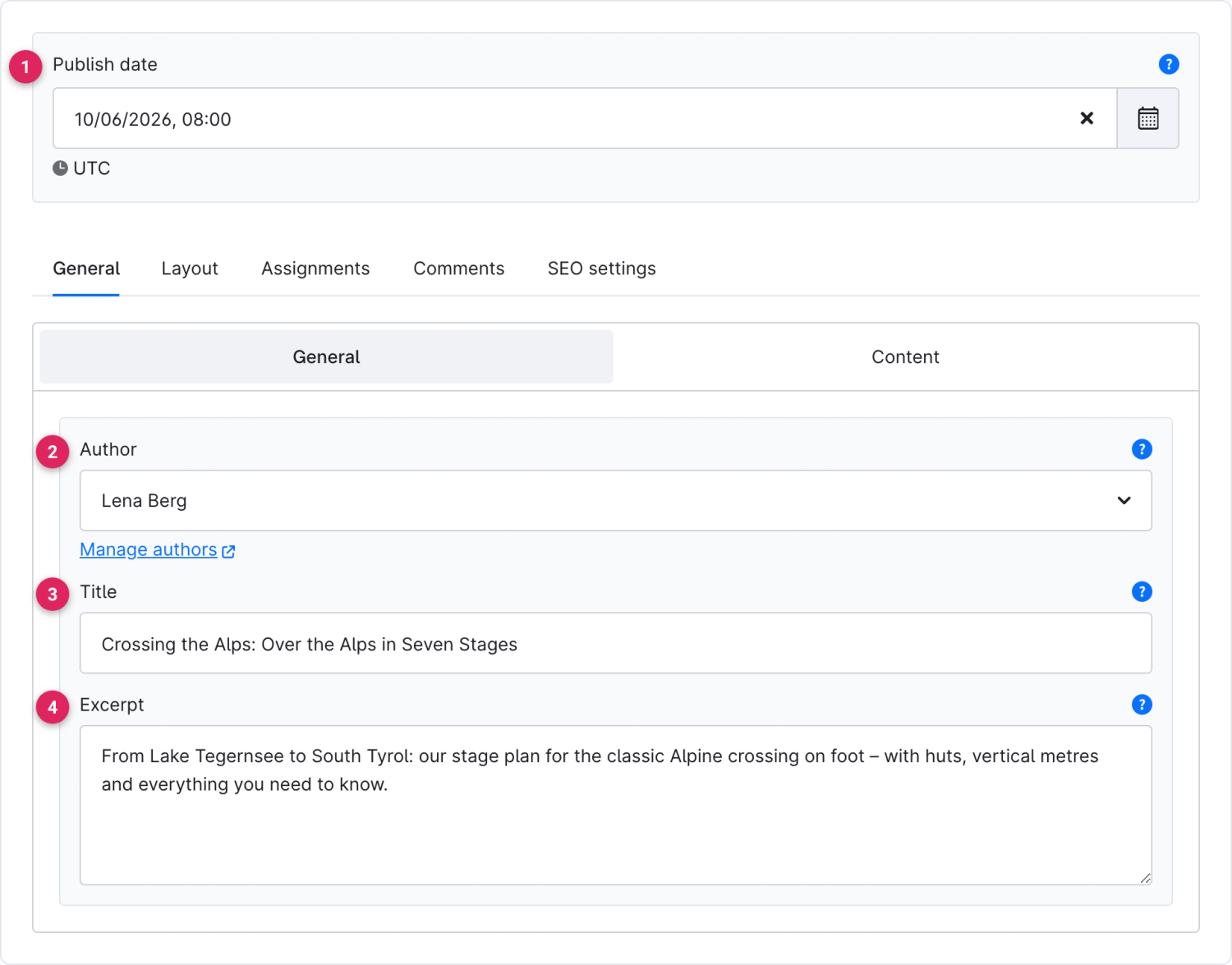
<figure><img src="https://118894700-files.gitbook.io/~/files/v0/b/gitbook-x-prod.appspot.com/o/spaces%2Fhdsmo3ttoHQpDlitXnzA%2Fuploads%2Fgit-blob-abe7454e51c99ebce230b8a4ce51d454465b5a4e%2Fblog-beitrag-allgemein.webp?alt=media" alt=""><figcaption></figcaption></figure>

<table><thead><tr><th width="287">Function</th><th>Description</th></tr></thead><tbody><tr><td>Publish date (1)</td><td>Time of publication. Appears as soon as the status is <strong>Scheduled</strong> or <strong>Published</strong>.</td></tr><tr><td>Author (2)</td><td>The author of the post. Use “Manage authors” to create new authors.</td></tr><tr><td>Title (3)</td><td>Heading of the post – also used for the SEO title.</td></tr><tr><td>Excerpt (4)</td><td>Short summary for lists and teasers. If left empty, the main text is truncated automatically.</td></tr></tbody></table>

## Content

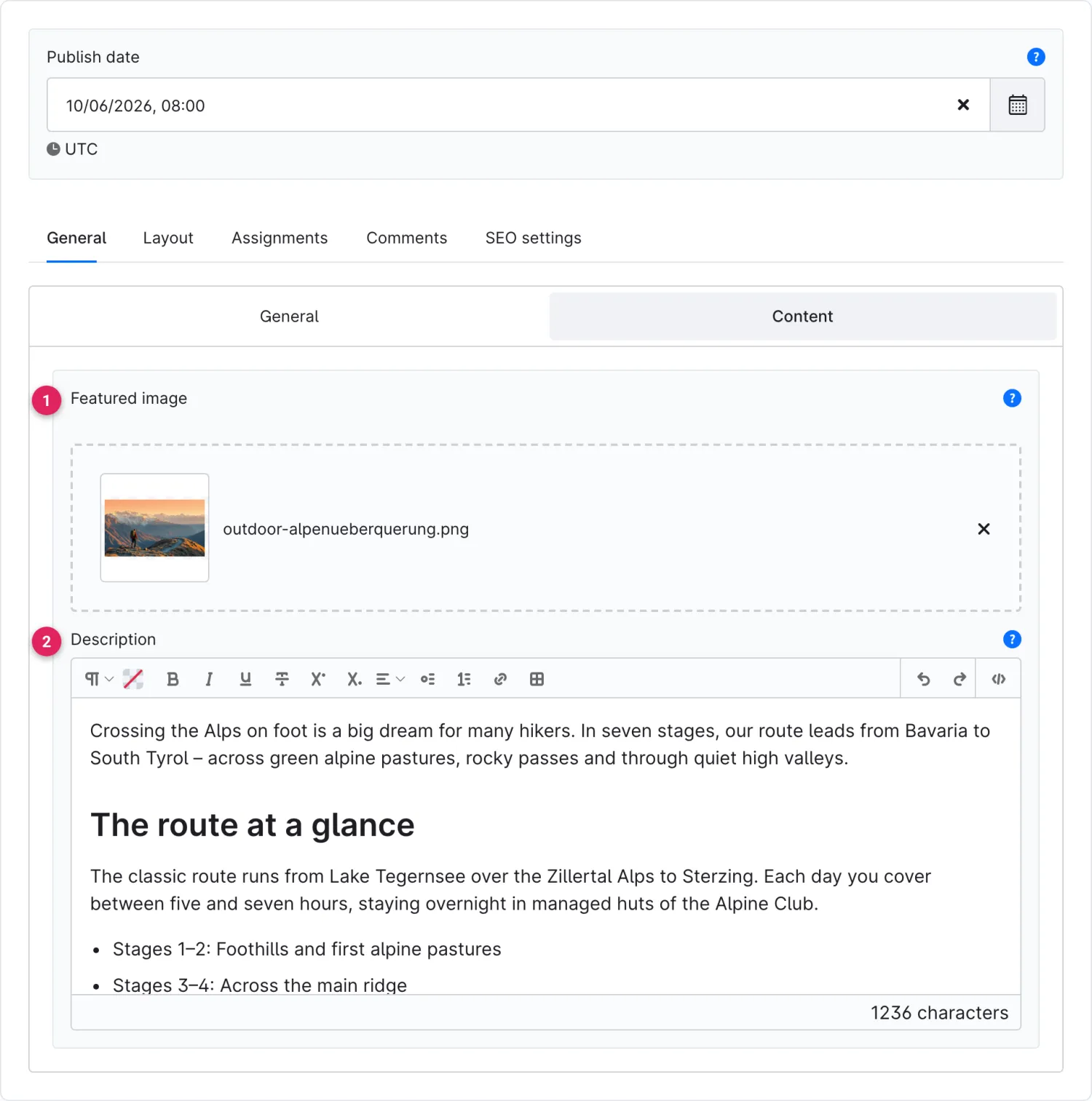
<figure><img src="https://118894700-files.gitbook.io/~/files/v0/b/gitbook-x-prod.appspot.com/o/spaces%2Fhdsmo3ttoHQpDlitXnzA%2Fuploads%2Fgit-blob-5f4eeb636a9f77db3a8ac44ec7f527b9408ba74e%2Fblog-beitrag-inhalt.webp?alt=media" alt=""><figcaption></figcaption></figure>

<table><thead><tr><th width="287">Function</th><th>Description</th></tr></thead><tbody><tr><td>Featured image (1)</td><td>Cover image shown in lists, teasers and in the post.</td></tr><tr><td>Description (2)</td><td>The main text of the post. The headings (H2/H3) in the editor feed e.g. the <a href="/cms-bundle/en/blog/elemente/inhaltsverzeichnis.md">table of contents</a>.</td></tr></tbody></table>

## Assignments

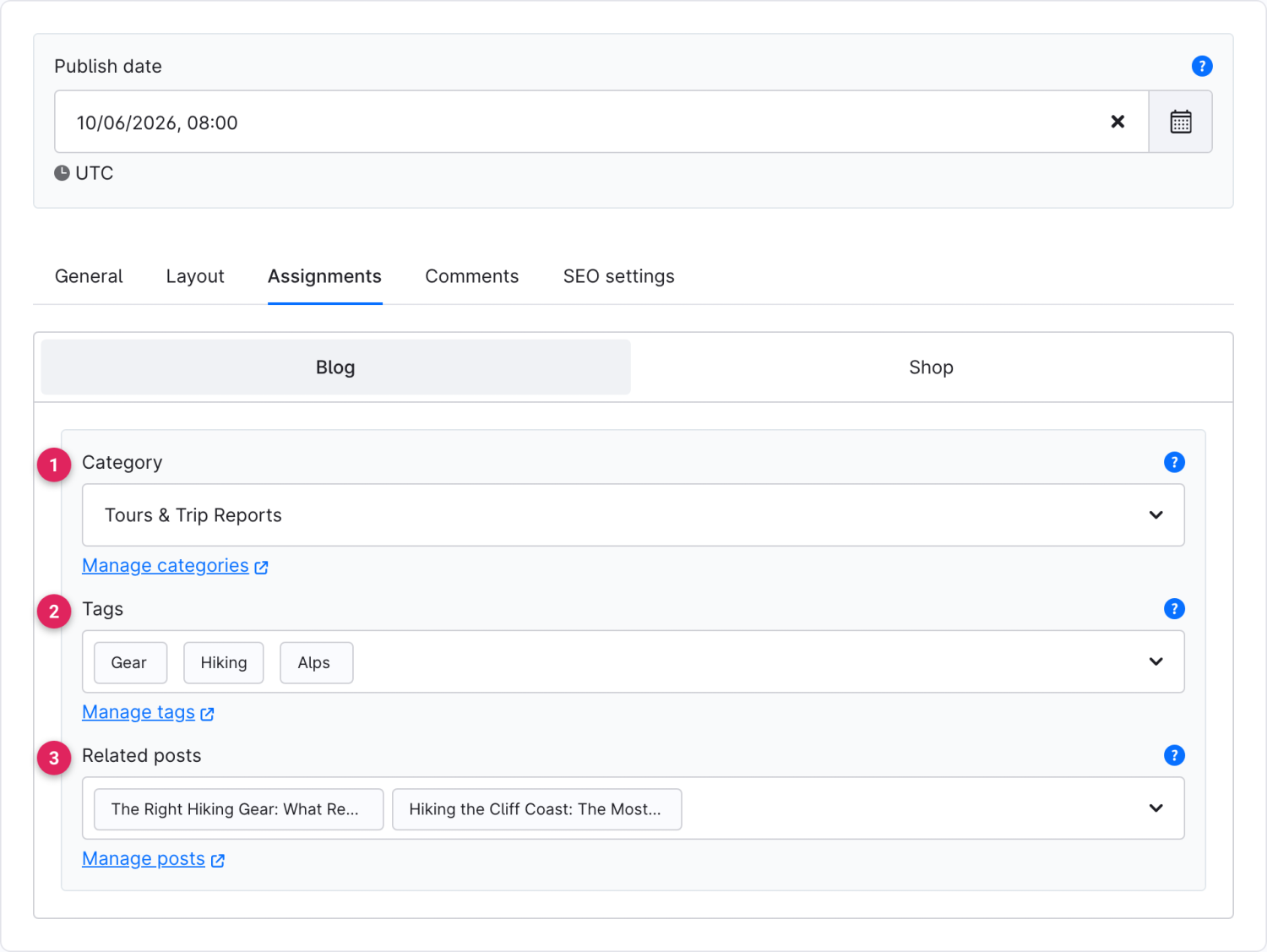
<figure><img src="https://118894700-files.gitbook.io/~/files/v0/b/gitbook-x-prod.appspot.com/o/spaces%2Fhdsmo3ttoHQpDlitXnzA%2Fuploads%2Fgit-blob-d0fef5adeeb27aea976f12af137e85a27782e13d%2Fblog-beitrag-zuordnungen.webp?alt=media" alt=""><figcaption></figcaption></figure>

<table><thead><tr><th width="287">Function</th><th>Description</th></tr></thead><tbody><tr><td>Category (1)</td><td>The category this post belongs to. A post belongs to exactly one category – through it the post is assigned to a blog.</td></tr><tr><td>Tags (2)</td><td>Keywords for tagging and filtering.</td></tr><tr><td>Related posts (3)</td><td>Manually linked, thematically similar posts for the <a href="/cms-bundle/en/blog/elemente/verwandte-beitraege.md">Related posts</a> element.</td></tr></tbody></table>

In the **Shop** sub-tab you additionally store products and product categories that the [Products](/cms-bundle/en/blog/elemente/produkte.md) and [Product categories](/cms-bundle/en/blog/elemente/produktkategorien.md) elements display in the post.

## Comments

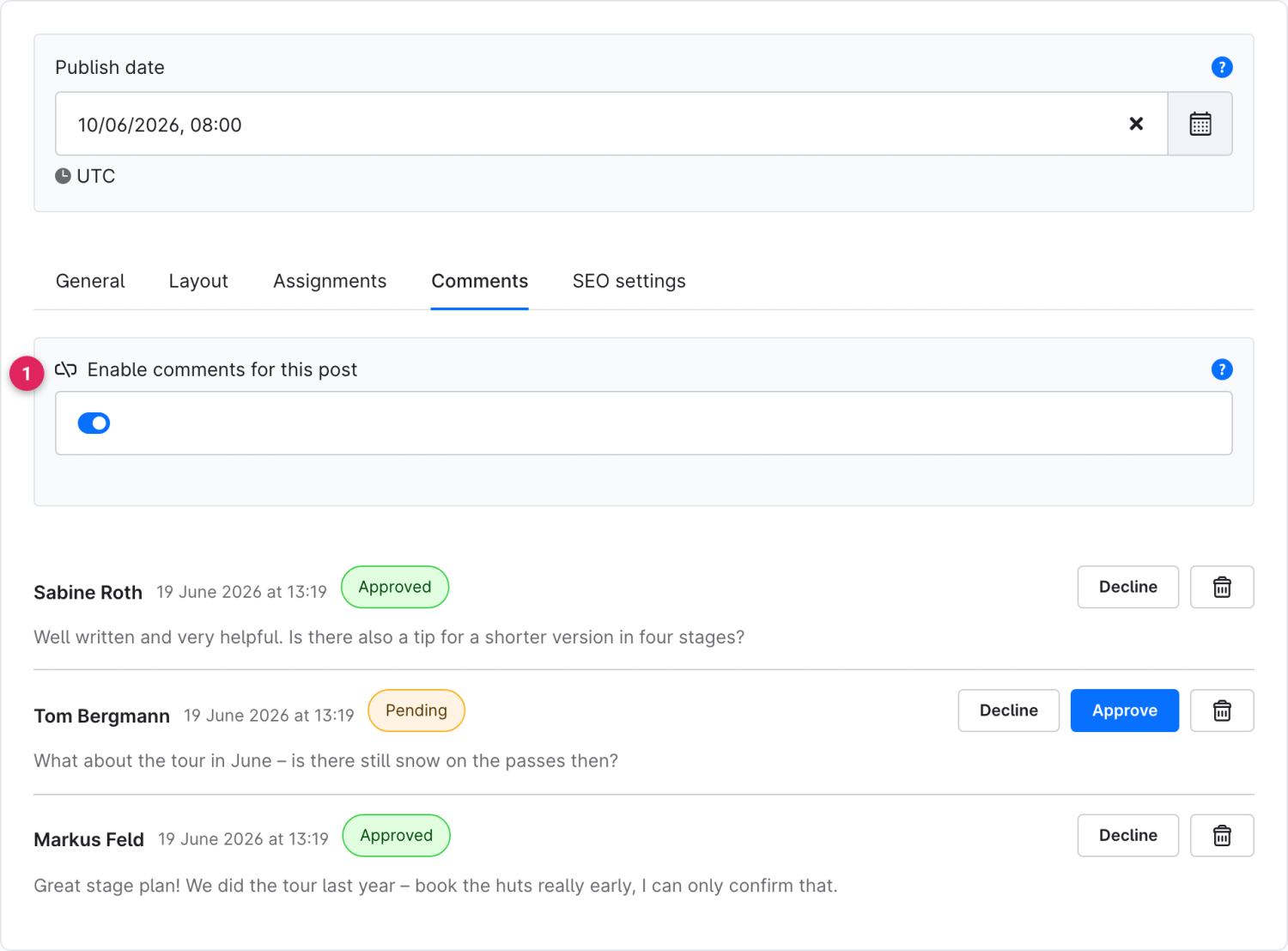
The **Comments** tab shows the reader comments for this post and lets you moderate them right in the editor.

<figure><img src="https://118894700-files.gitbook.io/~/files/v0/b/gitbook-x-prod.appspot.com/o/spaces%2Fhdsmo3ttoHQpDlitXnzA%2Fuploads%2Fgit-blob-d36a821da18ce61aba22652290c19c8d7093d541%2Fblog-beitrag-kommentare.webp?alt=media" alt=""><figcaption></figcaption></figure>

<table><thead><tr><th width="287">Function</th><th>Description</th></tr></thead><tbody><tr><td>Enable comments for this post (1)</td><td>By default it inherits the <a href="/cms-bundle/en/blog/verwaltung/blogs.md">blog setting</a>. Break the link (lock icon) to override it specifically for this post.</td></tr><tr><td>Approve / Decline / Delete</td><td>Moderate each comment directly: <strong>Approve</strong> publishes, <strong>Decline</strong> hides, the trash icon deletes permanently.</td></tr></tbody></table>

{% hint style="info" %}
Via the **Layout** and **SEO settings** tabs you assign the post its own shopping experience (overriding the blog default) or maintain the meta title, meta description and slug.
{% endhint %}