
> For the complete documentation index, see [llms.txt](https://docs.rh-webdesign.com/cms-bundle/llms.txt). Markdown versions of documentation pages are available by appending `.md` to page URLs; this page is available as [Markdown](https://docs.rh-webdesign.com/cms-bundle/en/blog/elemente/autor.md).

# Author

Introduce the author of a post with image, bio and contact.

The **Author** element introduces the author of the current post – with a profile picture, name and short bio. This gives your blog a face and strengthens your readers' trust.

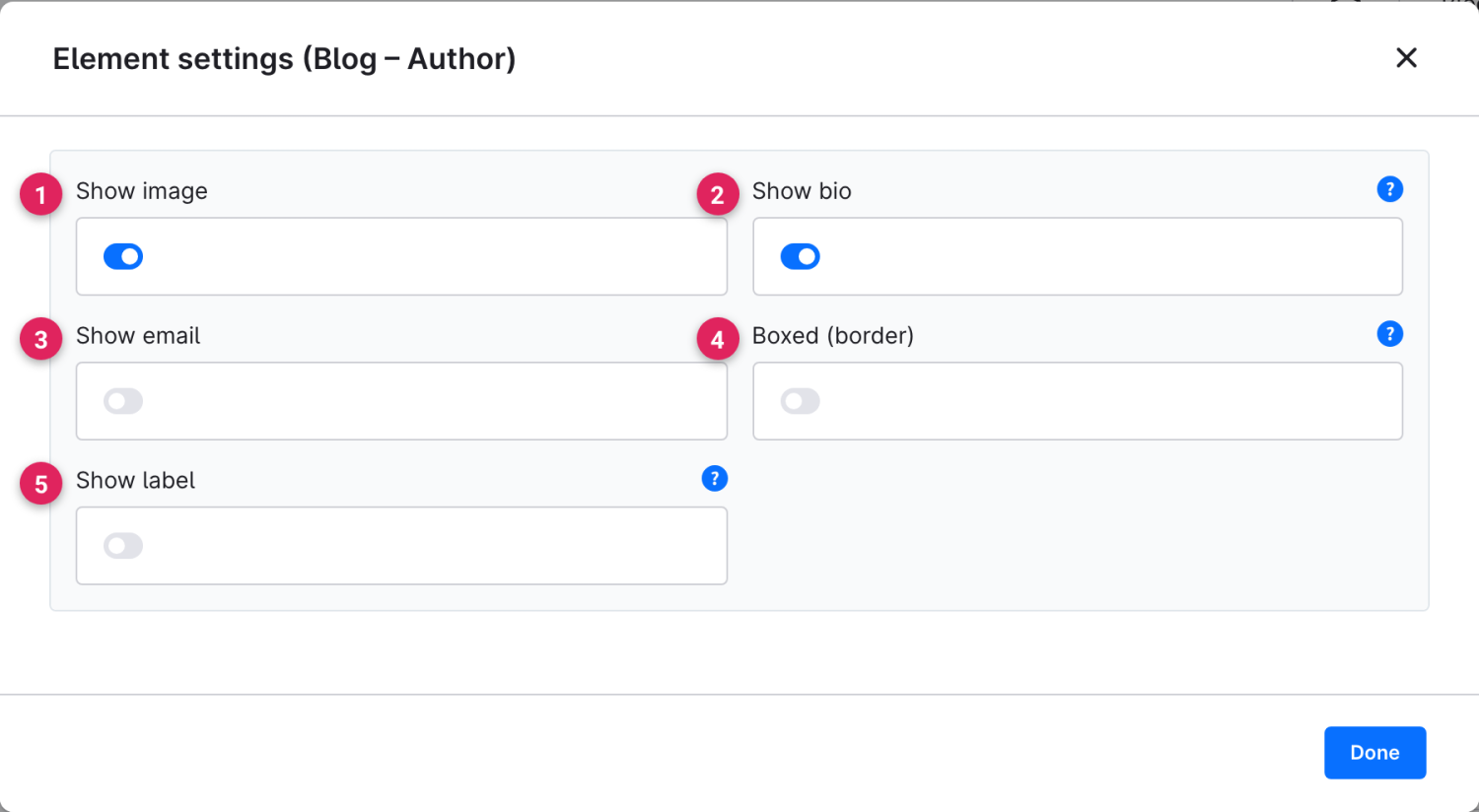
Use Shopware's **element picker** (the **Replace element** button) to add the **Author** element at the desired position – the field outlined in red.

<figure><img src="https://118894700-files.gitbook.io/~/files/v0/b/gitbook-x-prod.appspot.com/o/spaces%2Fhdsmo3ttoHQpDlitXnzA%2Fuploads%2Fgit-blob-e8c039a4a5ea84833bbb9c08c64a70251ad80661%2Fblog-autor-auswahl.webp?alt=media" alt=""><figcaption></figcaption></figure>

<figure><img src="https://118894700-files.gitbook.io/~/files/v0/b/gitbook-x-prod.appspot.com/o/spaces%2Fhdsmo3ttoHQpDlitXnzA%2Fuploads%2Fgit-blob-44b59cef0cb86ad96e51f77598a69f3433f4acee%2Fblog-autor-beispiel.webp?alt=media" alt=""><figcaption><p>Example in the storefront: author box with image and short bio</p></figcaption></figure>

### Element settings

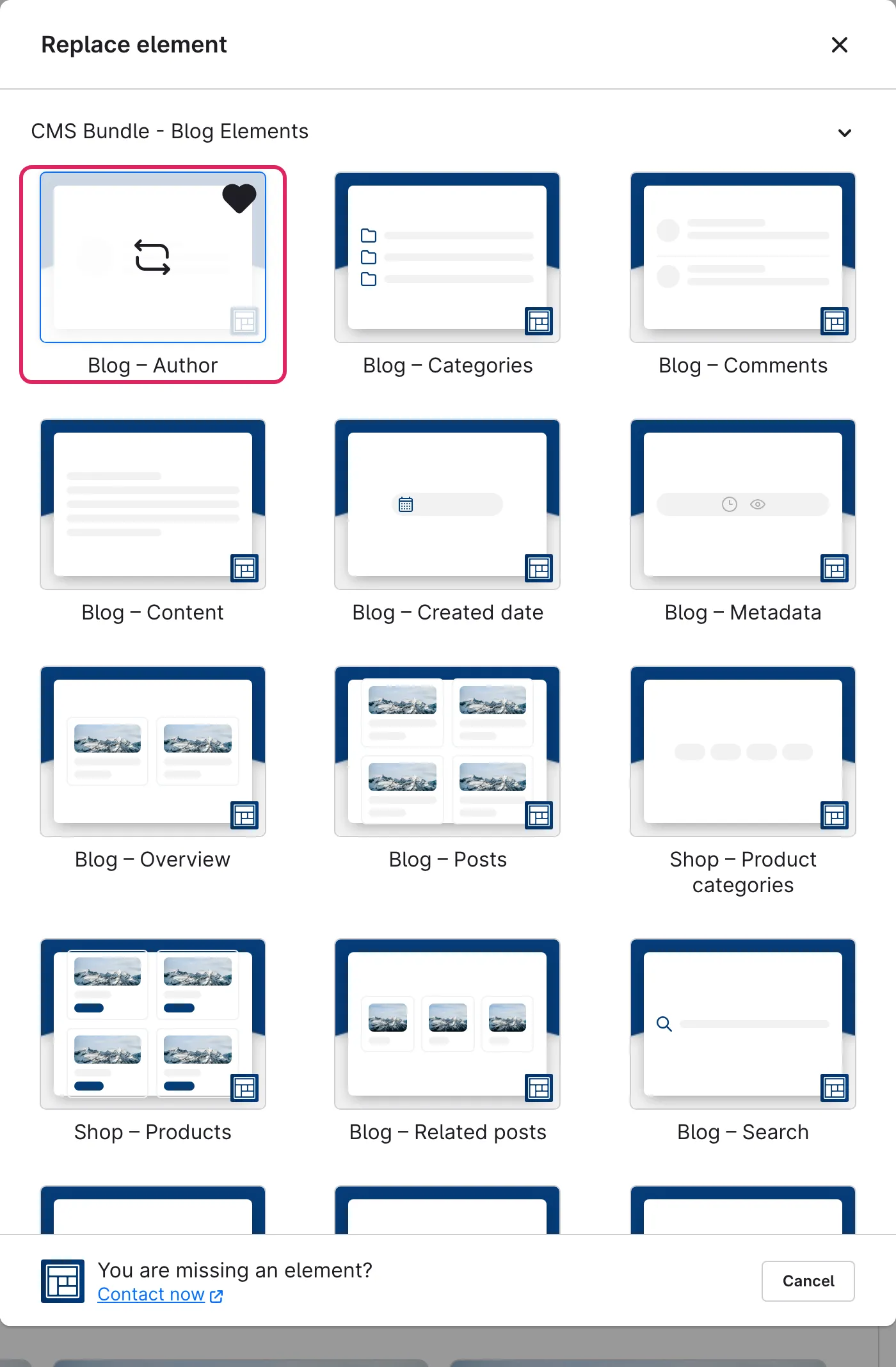
The switches define which information appears in the author box.

<figure><img src="https://118894700-files.gitbook.io/~/files/v0/b/gitbook-x-prod.appspot.com/o/spaces%2Fhdsmo3ttoHQpDlitXnzA%2Fuploads%2Fgit-blob-4d81bcb1a1197a2120690d2286a23431c982ba81%2Fblog-autor-einstellungen.webp?alt=media" alt=""><figcaption></figcaption></figure>

<table><thead><tr><th width="287">Function</th><th>Description</th></tr></thead><tbody><tr><td>Show image (1)</td><td>Shows the author's profile picture or avatar. If none is set, a placeholder appears automatically.</td></tr><tr><td>Show bio (2)</td><td>Shows the author's short bio – worthwhile as soon as you have maintained a bio for the author.</td></tr><tr><td>Show email (3)</td><td>Shows the author's email address. Only enable this if the address may be publicly visible.</td></tr><tr><td>Boxed (border) (4)</td><td>Sets the author box apart with a border so it stands out more clearly from the post.</td></tr><tr><td>Show label (5)</td><td>Shows a small caption above the name, e.g. "Written by".</td></tr></tbody></table>