> For the complete documentation index, see [llms.txt](https://docs.rh-webdesign.com/cms-bundle/llms.txt). Markdown versions of documentation pages are available by appending `.md` to page URLs; this page is available as [Markdown](https://docs.rh-webdesign.com/cms-bundle/elemente/firma-unternehmen/karten.md).

# Karten

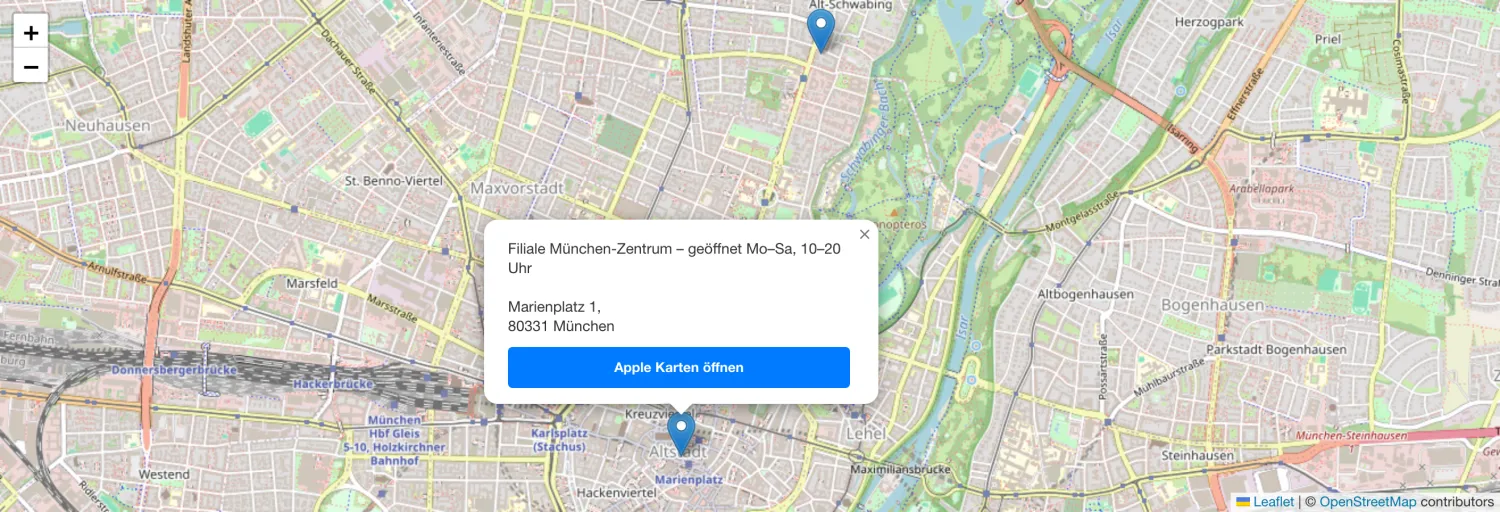
Mit dem Element **Karten** bettest du eine interaktive Karte (auf Basis von OpenStreetMap) in deine Erlebniswelt ein – ideal für Standort- und Kontaktseiten oder einen Filialfinder. Du gibst die Standorte einfach als Adresse ein; die Koordinaten werden automatisch ermittelt. Ein Klick auf einen Marker zeigt zusätzliche Informationen sowie einen Button, um die Route direkt in Apple bzw. Google Maps zu öffnen.

<figure><img src="/files/rxtNyz0Kl8pSUuEgclSO" alt=""><figcaption><p>Beispiel im Storefront: interaktive Karte mit zwei Standort-Markern und geöffnetem Info-Fenster</p></figcaption></figure>

{% hint style="success" %}
**Kein API-Schlüssel nötig**

Die Karte und die Adresssuche basieren auf OpenStreetMap. Du musst keinen Karten-Dienst einrichten oder einen API-Schlüssel hinterlegen.
{% endhint %}

### Allgemein

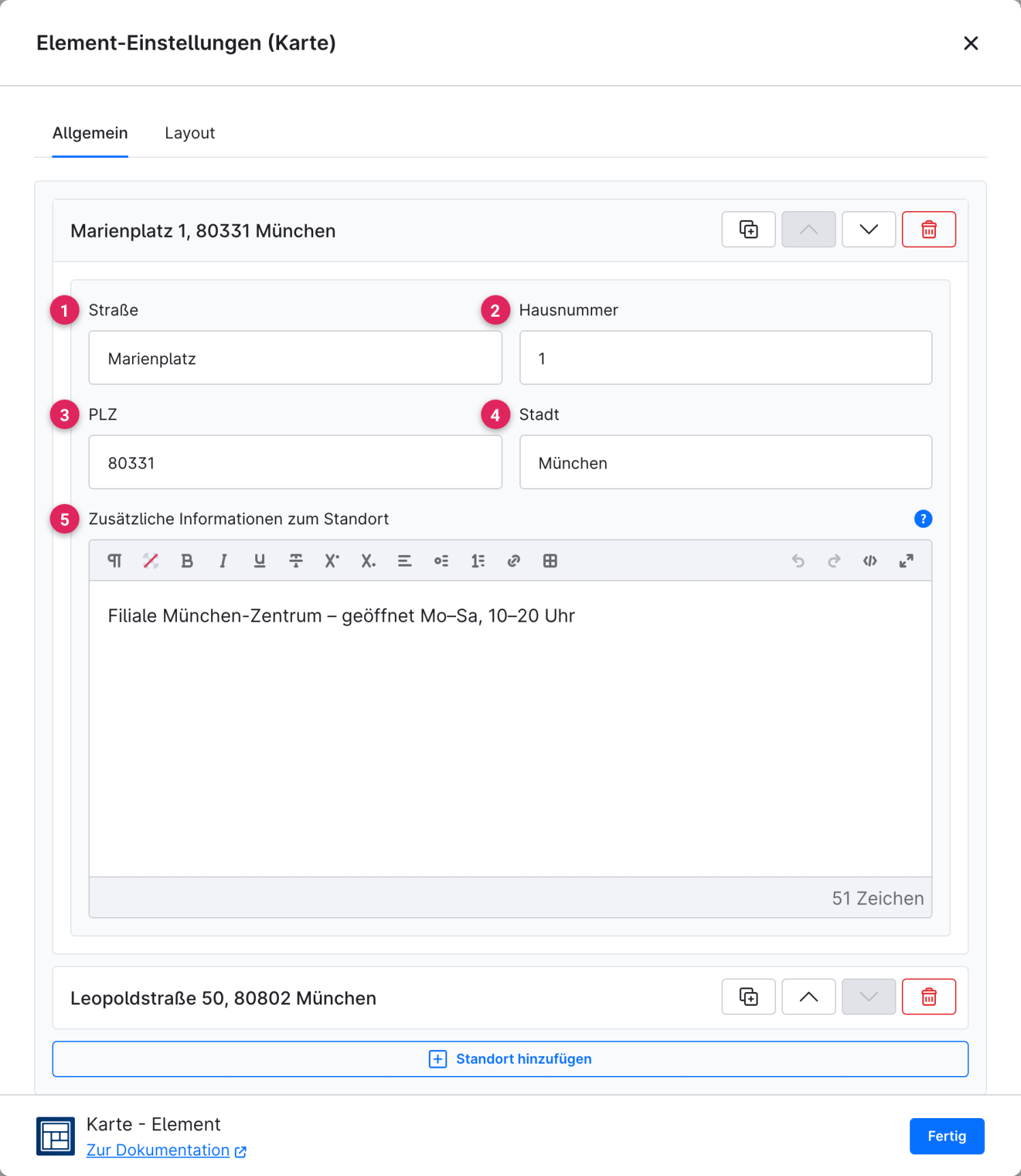
Im Reiter **Allgemein** legst du die Standorte an. Jeder Eintrag wird über seine Adresse definiert und automatisch auf der Karte verortet. Über **„Standort hinzufügen"** ergänzt du weitere Marker.

<figure><img src="/files/ETtJLD9Z87DvgNFtdUMg" alt=""><figcaption></figcaption></figure>

<table><thead><tr><th width="287">Funktion</th><th>Beschreibung</th></tr></thead><tbody><tr><td>Straße (1)</td><td>Straßenname des Standorts.</td></tr><tr><td>Hausnummer (2)</td><td>Hausnummer des Standorts.</td></tr><tr><td>PLZ (3)</td><td>Postleitzahl des Standorts.</td></tr><tr><td>Stadt (4)</td><td>Ort des Standorts. Aus Straße, PLZ und Stadt werden automatisch die Kartenkoordinaten ermittelt.</td></tr><tr><td>Zusätzliche Informationen zum Standort (5)</td><td>Optionaler Text, der beim Klick auf den Marker im Info-Fenster erscheint – z. B. Öffnungszeiten oder ein Hinweis zur Filiale.</td></tr></tbody></table>

{% hint style="info" %}
Über die Symbole rechts an jedem Eintrag kannst du einen Standort duplizieren, verschieben oder löschen. Sind mehrere Standorte hinterlegt, zoomt die Karte automatisch so, dass alle Marker sichtbar sind.
{% endhint %}

### Layout

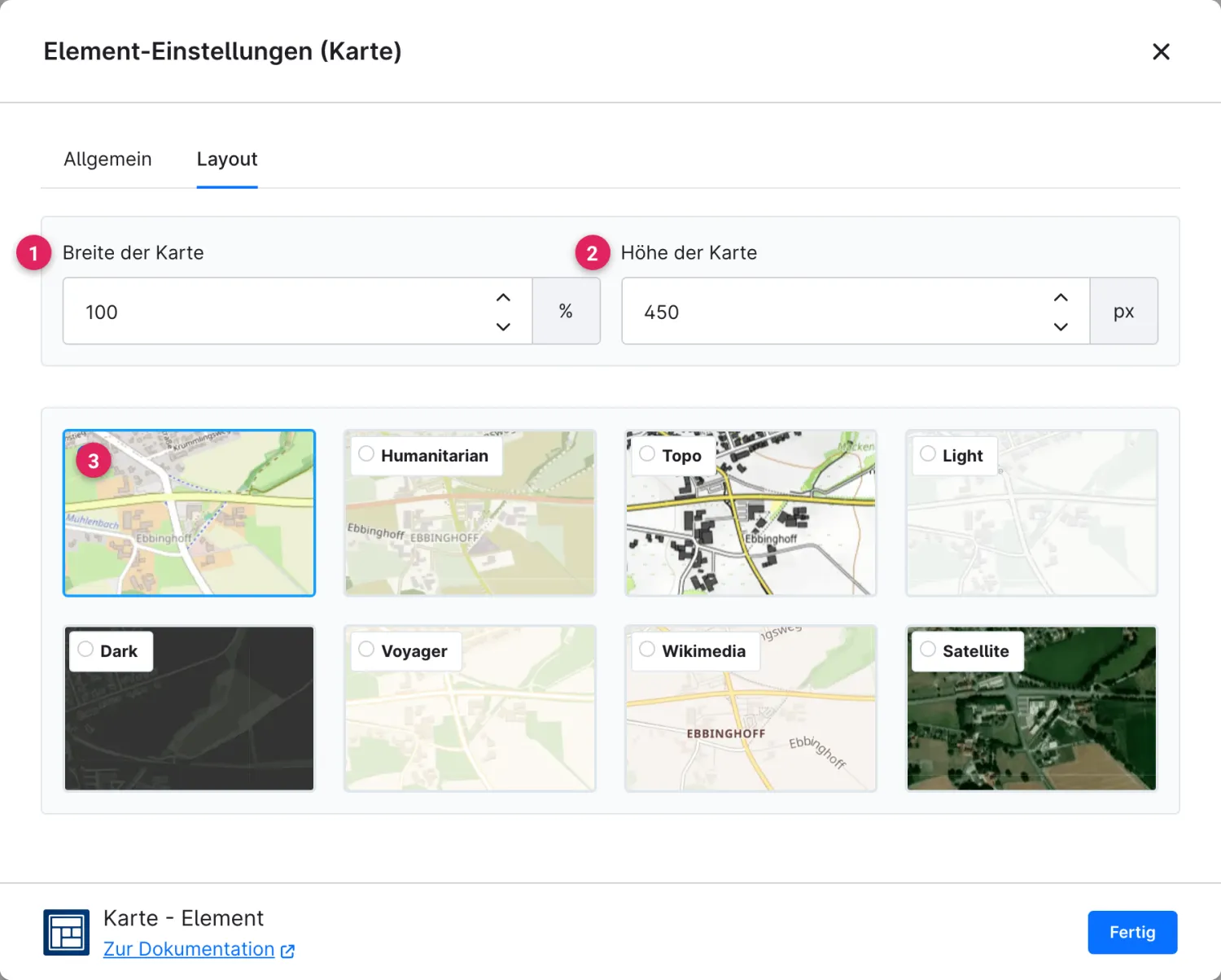
Im Reiter **Layout** bestimmst du Größe und Erscheinungsbild der Karte.

<figure><img src="/files/jl0nXLIz7vwR8bXcQbCr" alt=""><figcaption></figcaption></figure>

<table><thead><tr><th width="287">Funktion</th><th>Beschreibung</th></tr></thead><tbody><tr><td>Breite der Karte (1)</td><td>Breite des Kartenbereichs in Prozent oder Pixeln.</td></tr><tr><td>Höhe der Karte (2)</td><td>Höhe des Kartenbereichs in Pixeln oder vh.</td></tr><tr><td>Kartenstil (3)</td><td>Wähle das Aussehen der Karte. Zur Auswahl stehen <strong>Standard</strong>, <strong>Humanitarian</strong>, <strong>Topo</strong>, <strong>Light</strong>, <strong>Dark</strong>, <strong>Voyager</strong>, <strong>Wikimedia</strong> und <strong>Satellite</strong>.</td></tr></tbody></table>


---

# Agent Instructions
This documentation is published with GitBook. GitBook is the documentation platform designed so that both humans and AI agents can read, navigate, and reason over technical content effectively. Learn more at gitbook.com.

## Querying This Documentation
If you need additional information that is not directly available in this page, you can query the documentation dynamically by asking a question.

Perform an HTTP GET request on the current page URL with the `ask` query parameter, and the optional `goal` query parameter:

```
GET https://docs.rh-webdesign.com/cms-bundle/elemente/firma-unternehmen/karten.md?ask=<question>&goal=<endgoal>
```

`ask` is the immediate question: it should be specific, self-contained, and written in natural language.
`goal` is optional and describes the broader end goal you are ultimately trying to accomplish on behalf of the user. GitBook uses it to tailor the answer towards what is most useful for that goal.

The response will contain a direct answer to the question and relevant excerpts and sources from the documentation.

Use this mechanism when the answer is not explicitly present in the current page, you need clarification or additional context, or you want to retrieve related documentation sections.